ACT Stream TV 4K AI-Powered Live TV and OTT Entertainment
Bring your live TV channels, favorite OTT apps and games together onto one screen. With
ACT Stream TV 4K, you can stop clicking jumping between apps and enjoy seamless, high-quality entertainment
curated for you.
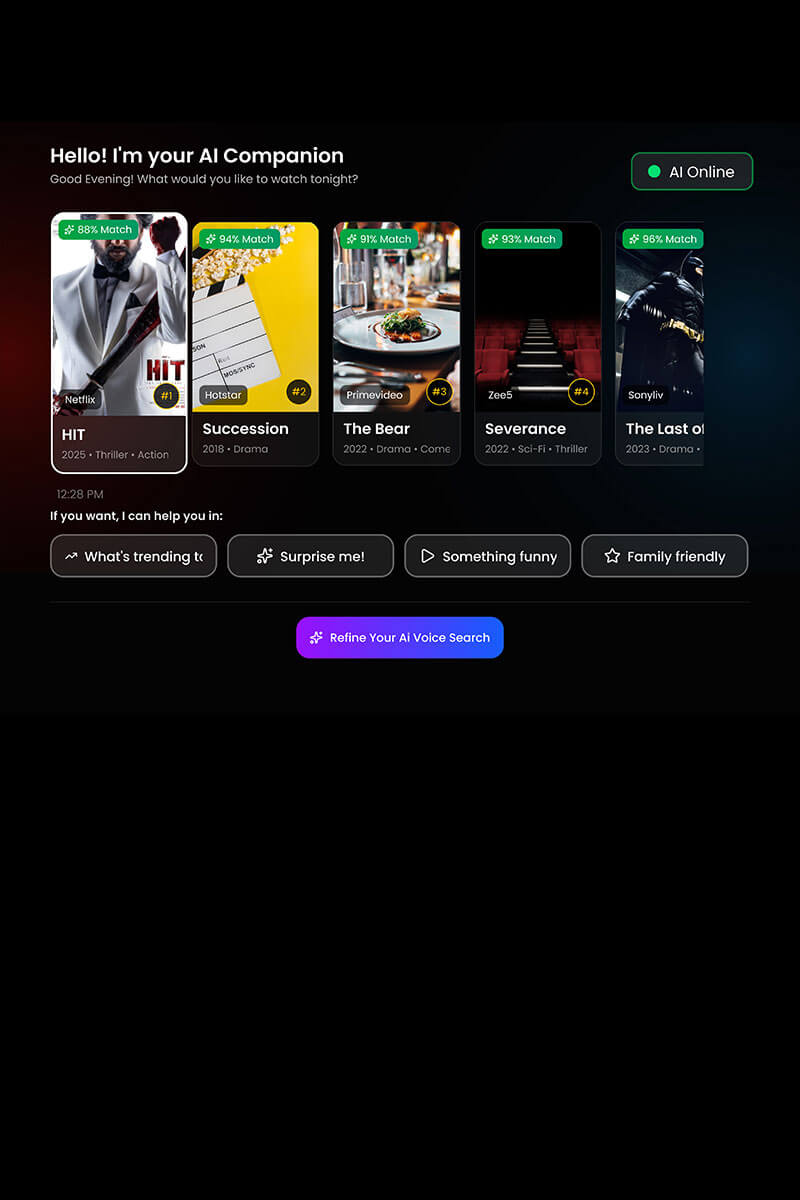
Finding something good to watch shouldn’t feel like work.The StreamTV 4K uses AI-powered voice search to look
through all your entertainment channels at the exact same time, helping you find your next favourite watch,
instantly.
AI-Integrated Voice Search
Tired of typing out long titles on a slow on-screen keyboard? Just press the AI button on your remote and
say what you want to see your options instantly.
Live TV + OTT in one place
Tired of switching between cable box and your streaming apps? The StreamTV 4K brings over 500 live TV
channels and your favorite subscription apps into one single menu.
Customisable Search
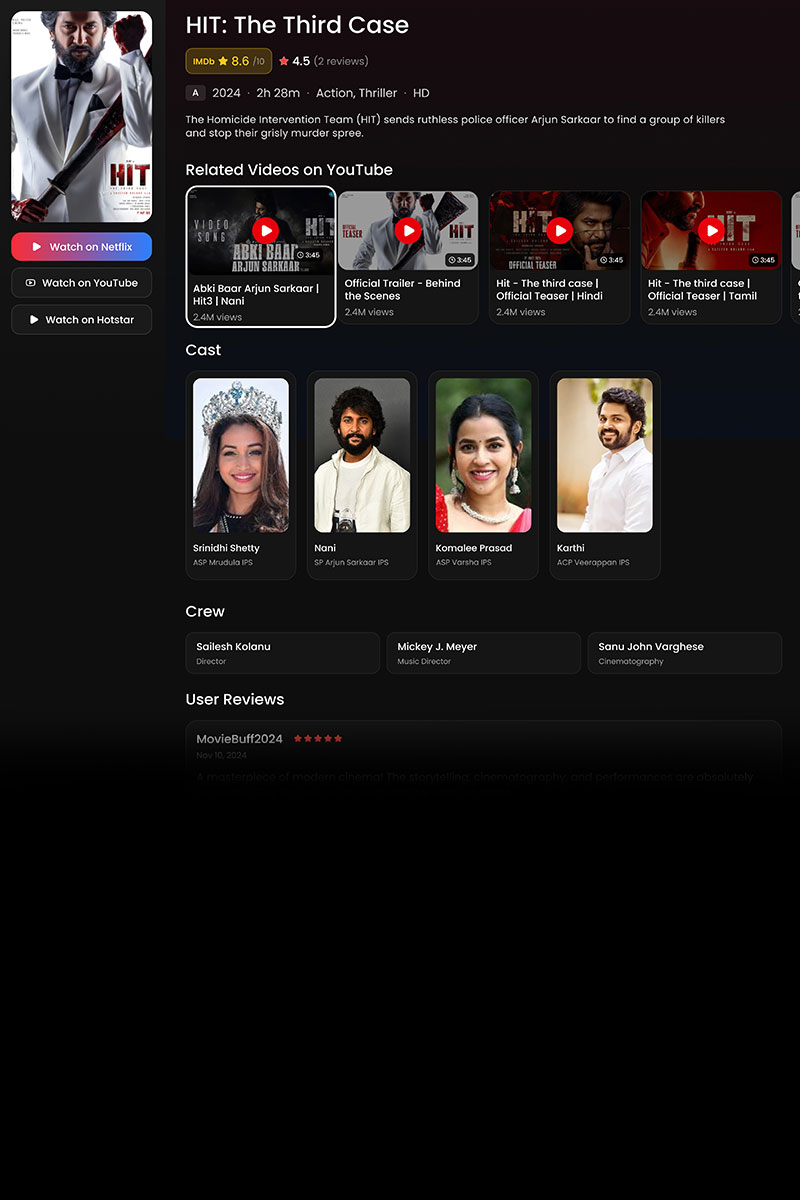
Want to see movie reviews or search in your preferred language? Our AI search brings trusted IMDb ratings
and cast details directly to your screen in any language you like.
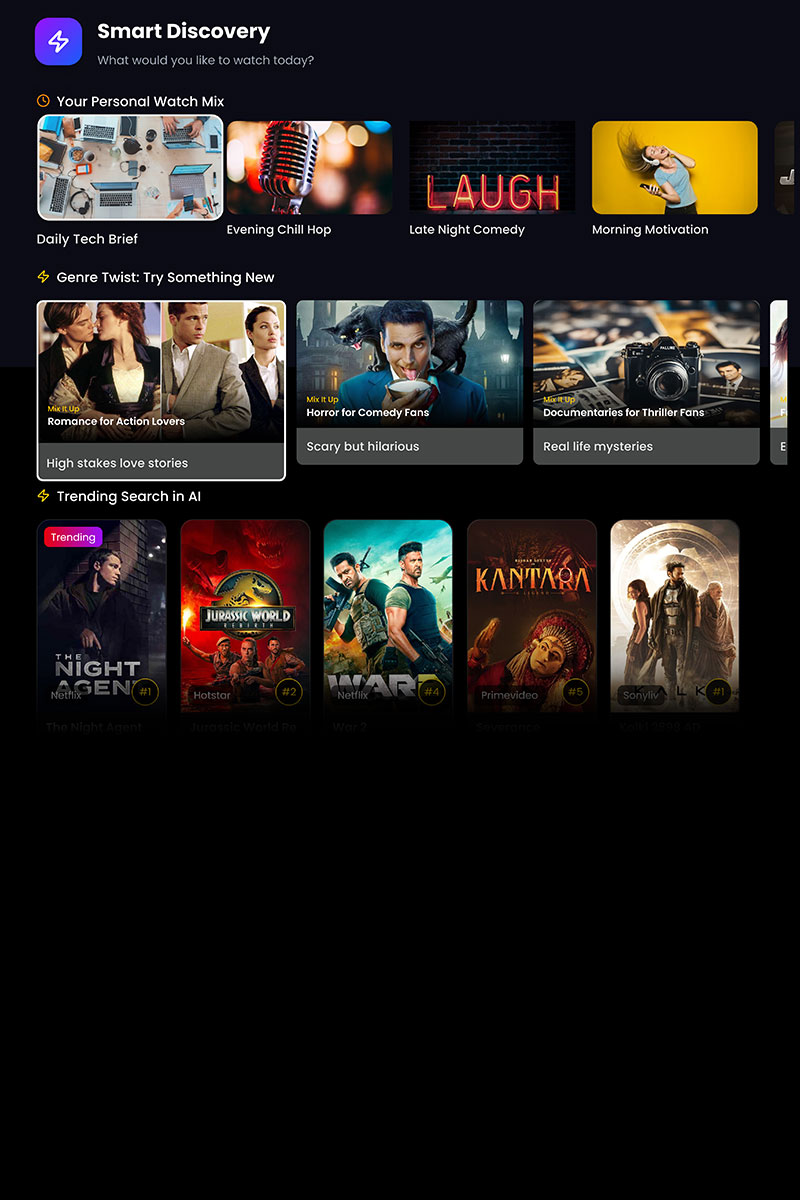
Personalised Content Discovery
Don't know what you're in the mood for? Our Smart Discovery section curates content based on your viewing
history so you can find your next favourite movie without having to search for it.
Take Complete Control with the Easy-to-Use
ACT StreamTV 4K Remote.
Navigating your TV should never feel frustrating or confusing. Our unique ACT StreamTV remote features OTT
buttons, easily accessible AI and voice search buttons, number pad for live TV and custom buttons for direct
functions, making entertainment smooth and immediate for everyone in the house.
Dedicated OTT Buttons
Accessible Voice & AI Search
Traditional Live TV Number Pad
Customisable Buttons
Choose Your ACT Stream TV 4K Plan
MOST POPULAR
Outright
₹4499one-time
Stream TV 4K Box
Customisable Remote
AI Search Feature
Access to all your favourite OTT apps (subscription not included)
Everything you need to know about the all-new Stream TV 4K 2025.
ACT Stream TV 4K is a latest Android 14 based device that allows you to watch movies and TV shows in 4K HDR
with Dolby sound. The device creates a personalized viewing experience across all platforms using AI,
removing the frustration of searching and helping you instantly find content you'll love. It is loaded with
apps like Netflix, Amazon Prime Video, JioHotstar, SonyLiv, Zee5 and 3000+ others that you can download from
the Google Play store. Please note that you can watch all your existing subscriptions from these apps on the
device; ACT does not provide these subscriptions unless they are part of your specific ACT plan. It also
includes a Live TV section with 450+ channels, allowing for an easy switch between OTT content and
traditional
Yes, except for Apps included in your ACT plan. These are authenticated automatically. Just open the app and
start watching — no separate sign-in required. For all other apps, you can download these from the playstore
and watch with your existing subscription.
On first launch, you'll be prompted to create a profile. Enter your name, set your age group, preferred
languages, and favourite genres to personalise recommendations. You can create additional profiles for the
whole family at any time from settings.
Yes. When creating a profile, enable the 'Is this for Kids?' option. The profile will then only show content
rated U and U/A 7+ across all OTT platforms. You can also set a 4-digit parental lock PIN to prevent
unauthorised changes.
Use the 'Forgot PIN' option on the lock screen. An OTP will be sent to your registered mobile number so you
can reset it.
The packaging includes an ACT Stream TV 4K device, voice assistant enabled remote, HDMI cable, power cable and
batteries.
You can sign-in to the ACT Stream TV4K in multiple ways. You can scan the on screen QR code from the OTT Login
section on the ACT Fibernet app. You can also sign-in using the registered mobile number with an OTP or with
your ACT Account ID and password.
OTP might be delayed due to unavailability or deliverability issues in Telecom operator’s network. In that
case, customers can try after some time or use the other methods to login to the device.
In order to ensure security of your account, your devices will be linked to your ACT account. You cannot use
other ACT accounts to log in to the device. If you wish to switch the account, you can deactivate the device
from the account by calling our customer support on the following toll-free number: +91 9121212121. Once the
Device is deactivated, you can request the subscription on another account.
Yes. The ACT StreamTV 4K will turn any older television into a fully functional smart TV. The only technical
requirement is that your television must have an available HDMI port to plug in the device.
Yes. The device features integrated Bluetooth connectivity and an optical audio output port. This allows you
to stream audio to external soundbars, home theater setups, or wireless headphones for a premium audio
experience.
Navigation & Remote
Use the TV Channels tab on the home screen, or press the dedicated “TV” button on your remote to watch the TV
channels. Switching between OTT apps is done with a single press from the remote (For Netflix, Amazon Prime,
JioHotstar, YouTube) — no need to return to the home screen each time. For other apps, you can return to the
home screen and click the apps from list of installed apps.
Yes. You can add, move and pin apps to any position. Netflix and Amazon Prime are pinned by default, but all
other apps are freely rearrangeable to suit your preferences.
Type the channel number (e.g. 101) using the remote from any screen to jump straight to it. You can also go to
the search icon on your home screen and say Play “Channel Name” and the channel will directly play.
Search & Discovery
Search works across all your apps and content at once. You can search by title, genre, language, cast, or app.
For the best experience, we recommend you press the AI button on your remote and search for anything you want
like the way you would ask your friend and enjoy an experience like never before. You can also go to the
search icon on the top right of your screen and speak your query using voice search or type your required
content. The Google Assistant voice search on the remote can also be used for results from YouTube.
Yes. Press the AI button and click on voice search to speak naturally — for example, "Show me something like
Sacred Games but funnier" or "Timepass ke liye kya hai?" The device understands natural language in multiple
languages. Voice search can also be enabled from the search icon on the Home screen as well.
Hover over any title — whether it's a show or a movie — and select "Add to Watchlist" or mark it as a
Favourite. It will be saved to your profile. You can also add TV channels as favourites by clicking the heart
icon on the player screen.
Spotlight is a curated discovery section on the home screen that highlights new releases, trending titles,
live events, and themed collections. For a cricket match, you'll find highlights and player stats. For a film,
you'll see reviews, reels, and influencer picks — all in one place.
AI & Personalisation
From the home screen, pressing the AI button opens the AI Companion where you can either search by voice or
use the Smart Discovery Panel that shows you personalised content based on your preferences. Any content
search by AI will help you with related content like cast information, reviews, IMDb ratings, and similar
titles.
Say goodbye to endless scrolling across different apps. With the smart voice and AI search engine, you can
look for content across all your platforms simultaneously using natural speech. Instead of searching for basic
titles, you can search by specific actors, target IMDb ratings, or exact family occasions. Simply hold the
microphone button and say "show me highly-rated sci-fi movies" or "family comedies for a weekend movie night"
to see a unified list of options instantly.
Yes. Two buttons (C1 and C2) are yours to customise. Press an unconfigured button and a prompt will appear.
You can assign actions like launching a favourite app, switching to Kids Mode, setting a 30-minute sleep
timer, switching rapidly between recent apps, or scrolling to the top of a page.
The platform supports creating up to six individual user profiles per device. This allows every member of your
household to maintain a personalized homepage row, individual watchlists, and unique AI-driven viewing
recommendations tailored to their personal tastes.
Plans & Payment
Your current plan details are available on the ACT Fibernet app. On Stream TV, go to the Offers tab and your
current plan details — including speed, price, validity, renewal date, and included OTT apps — will be shown
along with options to upgrade if you wish to.
Yes. In the Offers tab, browse available upgrade options, compare them side by side with your current plan,
and pay using a QR code — all without leaving your TV. The QR code has a short expiry window, so complete the
payment promptly after scanning.
Customers who decide to purchase the ACT Stream TV 4K would need to make a one-time payment for the device.
Customers who decide to take the device on a subscription model would need to pay the monthly rental amount
while subscribing, and this will be added to their ACT bill every month post that.
Your Stream TV subscription is auto-renewed every month. You will get a separate bill generated for the same
each month which you can pay via the ACT Fibernet app.
Because the Stream TV is engineered to run on ACT's high-speed SmartWiFi infrastructure, an active ACT
Fibernet connection is required to stream live TV channels and digital apps. If your broadband line is
temporarily suspended, the box will remain offline until your internet services are reactivated.
Yes. The device supports casting from mobile devices so you can send content from your phone straight to the
big screen.
Yes! The ACT StreamTV 4K is built to be an active family ecosystem, not just a passive video player. Through
the dedicated Games and Apps tabs on your home menu, you can explore and download a wide variety of casual
multiplayer games, arcade titles, and utility apps directly from the Google Play Store.
You can easily play many built-in games using the navigation buttons on your standard ACT StreamTV remote
control. For an upgraded gaming experience, the device features built-in USB and Bluetooth connectivity,
allowing you to connect external game controllers or storage expansion drives instantly.
Yes. You can connect USB sticks and game controllers for expanded storage and an enhanced gaming experience.
The device comes pre-installed with apps such as Netflix, Hotstar, Amazon Prime Video, YouTube, Zee5, Spotify,
and Sun NXT. Users may also download additional apps from the Google Play Store. With 32 GB of storage space,
downloading all your favourite apps is never going to be a problem.
Yes, the ACT Stream TV 4K requires an ACT Fibernet connection to connect online and stream your favourite
shows, movies and a lot more.
Live TV channels are included as per your respective plan. You can check the overall channel list at
https://www.actcorp.in/channel-list. If you do not have an active entertainment plan, a few free-to-air
channels are also included.
Customers may avail the benefit of all the OTT subscriptions that ACT offers through the ACT Stream TV 4K.
Apart from these subscriptions, customers may also use their existing subscriptions on supported platforms and
download additional apps from the Google Play Store.
Still have questions?
Our support team is available 24/7 to help you with your setup.




 Please wait while we redirect you
