Footer Bottom Menu

ACT FIBERNET

Wednesday, Sep 23, 2026 · 2 minutes

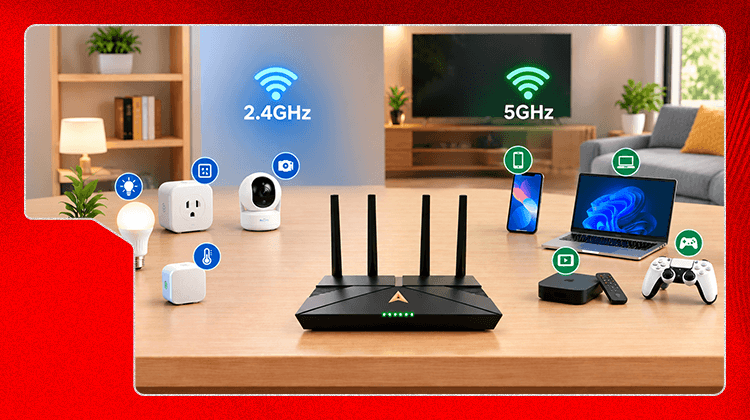
If you've noticed your smart bulbs, plugs, or camera never show up as an option on your 5GHz network, that's not a defect and it's not something you missed during setup. It's how nearly all smart home devices are built, and there's a straightforward reason for it.

Be Part Of Our Network

Terms and Conditions apply

Related blogs

38

blog
2 minutes read

Why Your Smart Home Devices Only Connect to 2.4GHz (And If That's a Problem)

Read more

34

blog
2 minutes read

Speed Test Lower Than Your Plan Promises? Router Problem vs Plan Problem

Read more

38

blog
2 minutes read

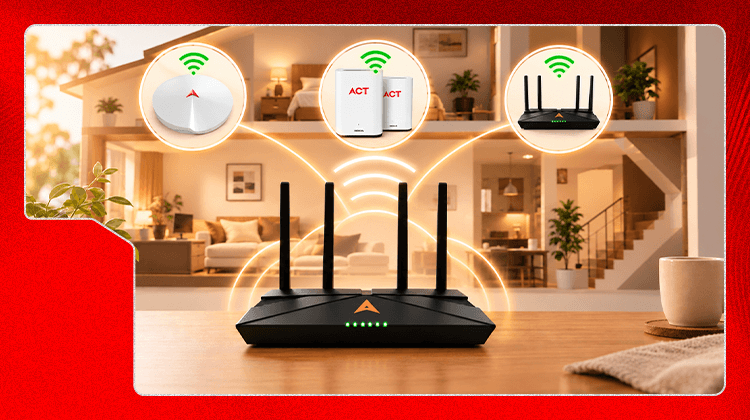
Wifi Extender vs Mesh System vs New Router: What Actually Fixes Patchy Coverage

Read more

ACT FIBERNET

Wednesday, Sep 23, 2026 · 2 minutes

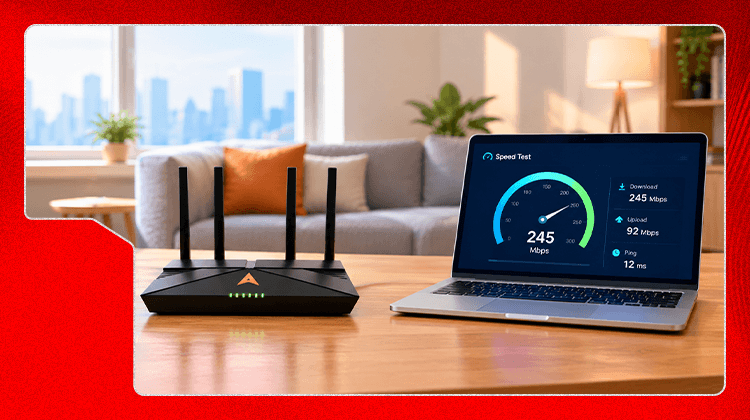
You run a speed test, the number is well below what your ACT Fibernet plan promises, and you don't know whether to blame the router or call your ISP. This is a five-minute way to find out which one it actually is, before you do either.

The one test that isolates the cause

Run the same speed test two ways: once with a laptop connected directly to the router via an Ethernet cable, and once over wifi on the same device, standing close to the router.

Be Part Of Our Network

Terms and Conditions apply

Related blogs

38

blog
2 minutes read

Why Your Smart Home Devices Only Connect to 2.4GHz (And If That's a Problem)

Read more

34

blog
2 minutes read

Speed Test Lower Than Your Plan Promises? Router Problem vs Plan Problem

Read more

38

blog
2 minutes read

Wifi Extender vs Mesh System vs New Router: What Actually Fixes Patchy Coverage

Read more

ACT FIBERNET

Wednesday, Sep 23, 2026 · 2 minutes

If you've already diagnosed a genuine coverage problem — a dead zone caused by distance or a concrete wall, not interference or placement — the next decision is which piece of hardware actually solves it. For most Indian homes, which are frequently multi-floor with concrete construction, the right answer depends less on budget and more on the layout of the home.

Be Part Of Our Network

Terms and Conditions apply

Related blogs

38

blog
2 minutes read

Why Your Smart Home Devices Only Connect to 2.4GHz (And If That's a Problem)

Read more

34

blog
2 minutes read

Speed Test Lower Than Your Plan Promises? Router Problem vs Plan Problem

Read more

38

blog
2 minutes read

Wifi Extender vs Mesh System vs New Router: What Actually Fixes Patchy Coverage

Read more

ACT FIBERNET

Wednesday, Sep 23, 2026 · 2 minutes


You did everything right — dual-band router, bands split, devices assigned sensibly — and there's still one spot in the house where wifi barely works. A dual-band router narrows down what's wrong, it doesn't automatically fix range. Here's how to actually diagnose it before spending on more hardware.

Be Part Of Our Network

Terms and Conditions apply

Related blogs

38

blog
2 minutes read

Why Your Smart Home Devices Only Connect to 2.4GHz (And If That's a Problem)

Read more

34

blog
2 minutes read

Speed Test Lower Than Your Plan Promises? Router Problem vs Plan Problem

Read more

38

blog
2 minutes read

Wifi Extender vs Mesh System vs New Router: What Actually Fixes Patchy Coverage

Read more

ACT FIBERNET

Wednesday, Sep 23, 2026 · 2 minutes

A few weeks after splitting their bands, some people go looking for how to undo it. Managing two network names, remembering which devices go where, and re-entering passwords when you add a new gadget gets tiring. This is the honest answer on whether merging back is a step backward or just a reasonable trade for convenience.

Be Part Of Our Network

Terms and Conditions apply

Related blogs

38

blog
2 minutes read

Why Your Smart Home Devices Only Connect to 2.4GHz (And If That's a Problem)

Read more

34

blog
2 minutes read

Speed Test Lower Than Your Plan Promises? Router Problem vs Plan Problem

Read more

38

blog
2 minutes read

Wifi Extender vs Mesh System vs New Router: What Actually Fixes Patchy Coverage

Read more

ACT FIBERNET

Wednesday, Sep 23, 2026 · 2 minutes

Two settings get glossed over during router setup: which security protocol to use, and which channel each band should run on. Both take under a minute to set correctly and both directly affect your day-to-day wifi experience.

Be Part Of Our Network

Terms and Conditions apply

Related blogs

38

blog
2 minutes read

Why Your Smart Home Devices Only Connect to 2.4GHz (And If That's a Problem)

Read more

34

blog
2 minutes read

Speed Test Lower Than Your Plan Promises? Router Problem vs Plan Problem

Read more

38

blog
2 minutes read

Wifi Extender vs Mesh System vs New Router: What Actually Fixes Patchy Coverage

Read more

ACT FIBERNET

Wednesday, Sep 23, 2026 · 2 minutes

You've split your bands and set two separate network names, but one device still won't see the 5GHz network. This is one of the most common points people get stuck at, and it's rarely the router's fault. There are three real causes, and each has a different fix.

Be Part Of Our Network

Terms and Conditions apply

Related blogs

38

blog
2 minutes read

Why Your Smart Home Devices Only Connect to 2.4GHz (And If That's a Problem)

Read more

34

blog
2 minutes read

Speed Test Lower Than Your Plan Promises? Router Problem vs Plan Problem

Read more

38

blog
2 minutes read

Wifi Extender vs Mesh System vs New Router: What Actually Fixes Patchy Coverage

Read more

ACT FIBERNET

Wednesday, Sep 23, 2026 · 2 minutes

If you bought a dual-band router and still only see one wifi name on your phone, that's normal, not a fault. Most dual-band routers ship with band steering turned on, which combines both bands under a single network name and quietly decides which device goes where. That's convenient, but it removes your ability to control it, and it's often why heavier devices don't get the 5GHz speed you paid for.

Be Part Of Our Network

Terms and Conditions apply

Related blogs

38

blog
2 minutes read

Why Your Smart Home Devices Only Connect to 2.4GHz (And If That's a Problem)

Read more

34

blog
2 minutes read

Speed Test Lower Than Your Plan Promises? Router Problem vs Plan Problem

Read more

38

blog
2 minutes read

Wifi Extender vs Mesh System vs New Router: What Actually Fixes Patchy Coverage

Read more

ACT FIBERNET

Wednesday, Sep 23, 2026 · 2 minutes

Most people upgrade their router when something feels slow, without checking whether the actual cause is too many devices competing for the same connection. This gives you a way to score your home before you spend on new hardware.

Not every device costs the same

A smart plug checking in once a minute and a laptop streaming a 4K video call are both "one device," but they don't put the same load on your router. Scoring devices by weight gives a more honest picture than just counting them.

Be Part Of Our Network

Terms and Conditions apply

Related blogs

38

blog
2 minutes read

Why Your Smart Home Devices Only Connect to 2.4GHz (And If That's a Problem)

Read more

34

blog
2 minutes read

Speed Test Lower Than Your Plan Promises? Router Problem vs Plan Problem

Read more

38

blog
2 minutes read

Wifi Extender vs Mesh System vs New Router: What Actually Fixes Patchy Coverage

Read more

ACT FIBERNET

Wednesday, Sep 23, 2026 · 4 minutes

If you've searched for "2.4GHz vs 5GHz," you've probably landed on a page that explains frequencies, ranges, and interference in the abstract. That's useful once you already know what's wrong with your wifi. It's not useful when you're standing in your living room wondering why Netflix keeps buffering.

This guide works backward from your actual problem. Match your symptom below to a band, then decide if you need a dual-band router at all.

Be Part Of Our Network

Terms and Conditions apply

Related blogs

38

blog
2 minutes read

Why Your Smart Home Devices Only Connect to 2.4GHz (And If That's a Problem)

Read more

34

blog
2 minutes read

Speed Test Lower Than Your Plan Promises? Router Problem vs Plan Problem

Read more

38

blog
2 minutes read

Wifi Extender vs Mesh System vs New Router: What Actually Fixes Patchy Coverage

Read more
Subscribe to
2 Help us guide
How may i help you?