How to Customize Your Remote - ACT
Monday, Sep 21, 2026 · 4 minutes


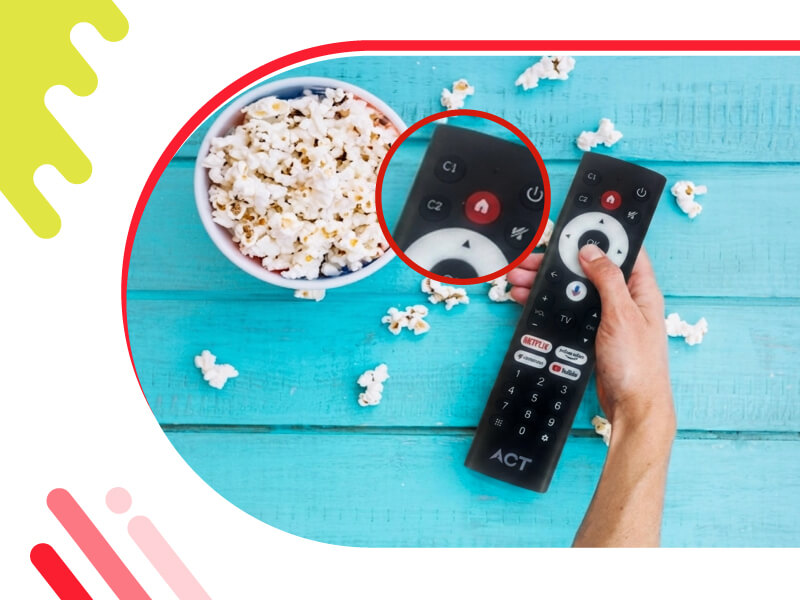
The best part about a modern smart TV is how it can adapt to your family's daily habits. In most homes, everyone has their own viewing routine - whether it is parents checking the morning news, kids watching their favourite cartoons, or movie lovers jumping straight into regional cinema. However, clicking through multiple menus and rows of icons just to open your favourite app or change a setting can get frustrating.
The ACT StreamTV 4K solves this problem directly with the C1 and C2 custom buttons right on your remote. Instead of wasting time digging through settings or scrolling endlessly, you can program these two dedicated keys to perform specific actions instantly. Here is a simple guide on how to set up your custom buttons and make your remote work for you.
The ACT StreamTV 4K lets you assign your C1 and C2 buttons to a variety of helpful, built-in functions. Depending on what you watch most, you can choose from these options:
Setting up your C1 and C2 buttons takes less than a minute. You can map them by following these simple steps:
A quick on-screen message will confirm that your shortcut is saved. Now, whenever you press that button, it will trigger your chosen action instantly.
Your viewing habits change, and your remote can change with them. If you assign the C1 button to a sports app during a major cricket tournament, you can easily change it to something else once the season ends.
To reprogram a button, simply repeat the steps above. Press and hold the C1 or C2 button again for 5 seconds from the home screen, and the mapping menu will reappear. Highlight your new choice, press Select, and the remote will instantly update to your new preference.
The C1 and C2 custom buttons are designed to take the friction out of your TV time. By setting up these shortcuts, you cut down on unnecessary clicks and make the user interface much easier to navigate for everyone in the house - from young children to grandparents. Take a moment to program your keys today and enjoy a faster, smoother entertainment experience powered by ACT Smart WiFi.

Lead has been submitted successfully.
 Please wait while we redirect you
One of our representatives will reach out to you shortly
One of our representatives will reach out to your shortly
Please wait while we redirect you

Please enter your registered phone number to proceed
Please enter correct OTP to proceed

Dear customer you are successfully subscribed
Please wait while we redirect you
Your ACT Shield subscription has been successfully deactivated
Please wait while we redirect you
Dear user, Your account doesn't have an active subscription
Please wait while we redirect you
Dear customer Entertainment pack is already activated.
Please wait while we redirect you